The only testing tool that makes websites AI-compatible
Record tests by browsing. Generate them from plain English. Run across 5 browser options in parallel. When they break, AI heals them automatically. Export an MCP server and any AI can operate your website. 55+ features from visual regression to AI bridge export — the most complete AI testing platform available.
Watch how AI transforms your testing workflow
Record your workflows. Certify them. Click Export. Now any AI assistant — Claude, GPT, or others — can operate that website through natural language. No API required. No developer effort on the website side.
Record user workflows on any website. Certify (lock) the ones that are production-ready. The AI auto-annotates each step with human-readable descriptions.
Click the purple robot button. A standalone MCP server package downloads as a zip — complete with Playwright automation, tool definitions, and setup instructions.
Configure Claude Desktop (or any MCP-compatible AI client) with one JSON snippet. The AI can now run workflows, fill forms, navigate pages, and compose new actions.
Each certified test becomes a callable tool with parameters. login(email, password), create_template(name, type), submit_form(name, email, message).
Low-level primitives (click, fill, navigate, screenshot, etc.) the AI composes for NEW actions not covered by recordings.
analyze_task(description) fuzzy-matches a plain English request to the right workflow and returns mandatory field questions. No AI API key needed.
Scan data exposed as resources (site://pages, site://elements/{page}, site://mandatory-fields) so the AI knows every page, field, and validation rule.
Real screenshots from AA Regression Tester v3.0
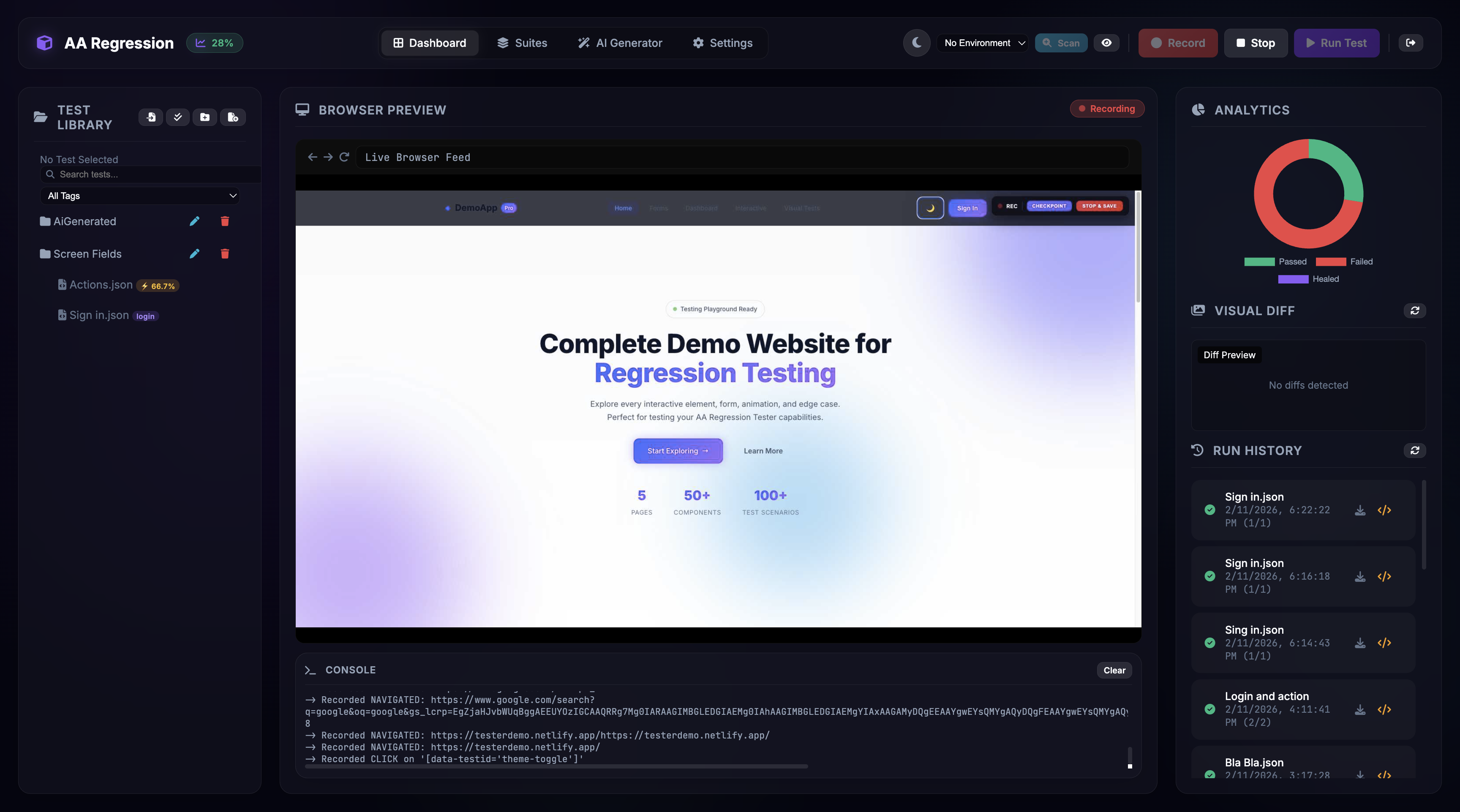
Manage your test library with folders, tags, and search on the left. Watch live browser previews and console output in the center. Review visual diffs, run history, and analytics on the right.
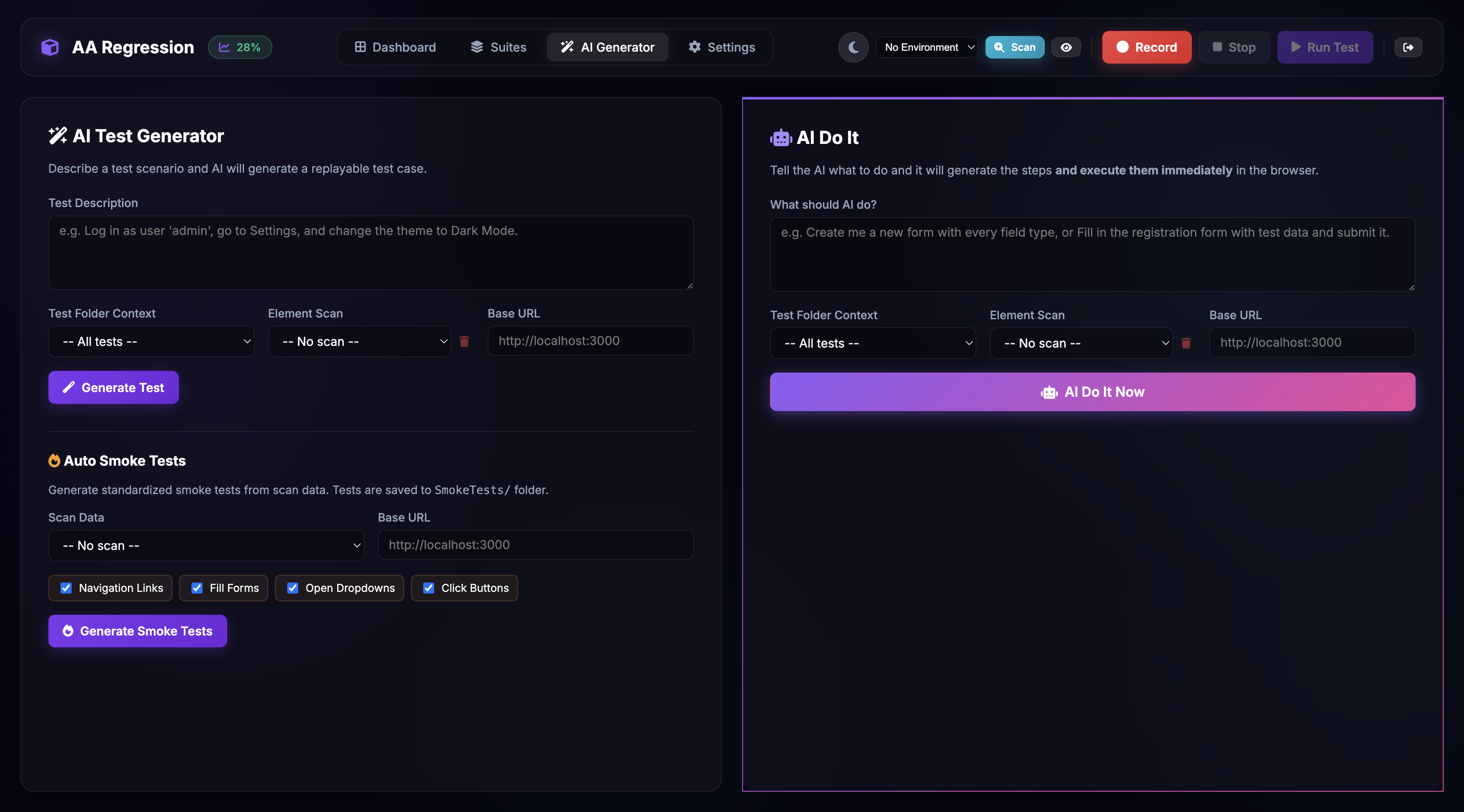
Describe what you want to test in plain English. Choose from "AI Do It" for instant generate-and-run, or use Auto Smoke Tests to create navigation, form, dropdown, and button tests automatically from your scanned elements.
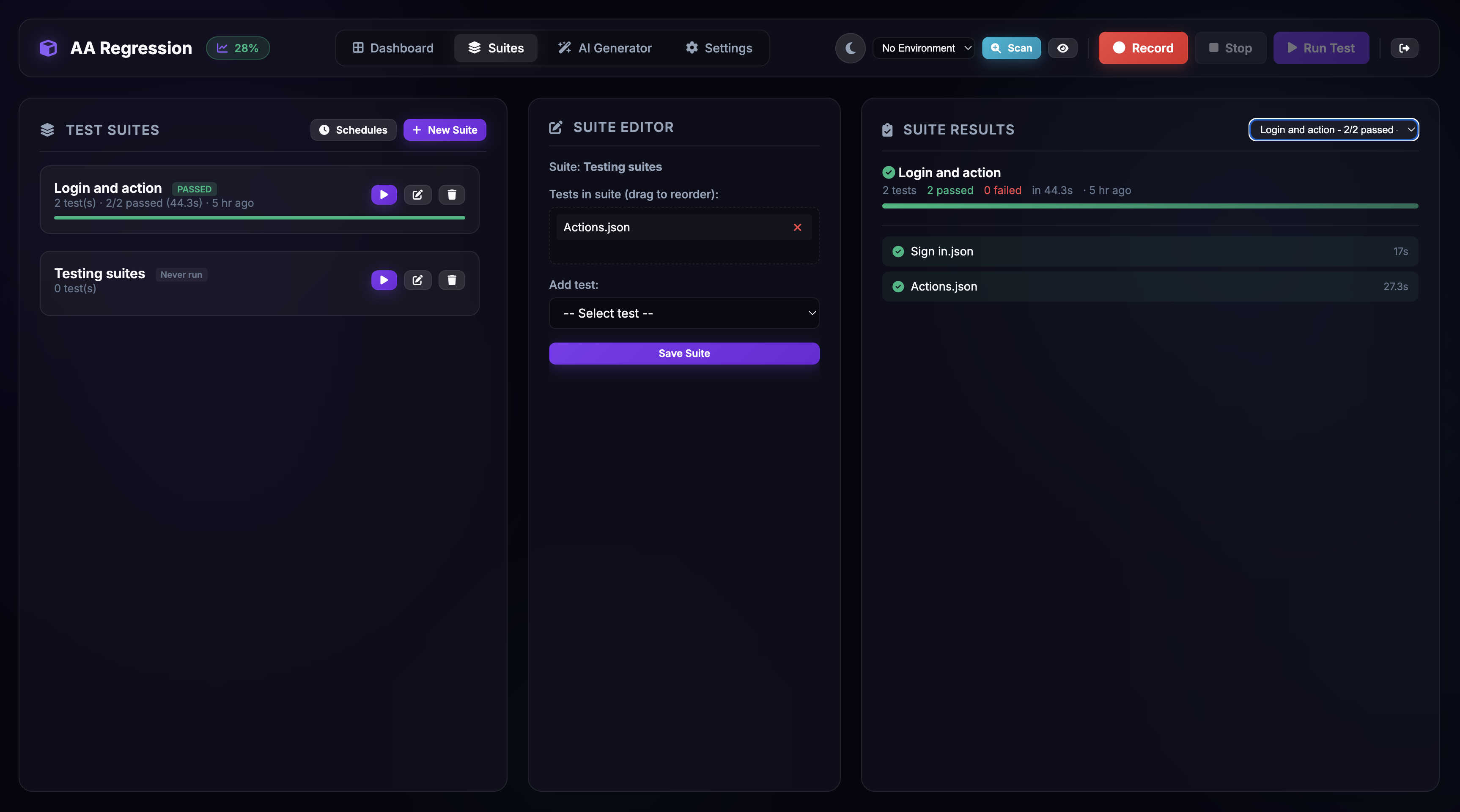
Organize tests into suites and run them sequentially or in parallel with up to 8 workers. Schedule runs with cron expressions. View live progress, pass/fail badges, duration tracking, and suite history at a glance.
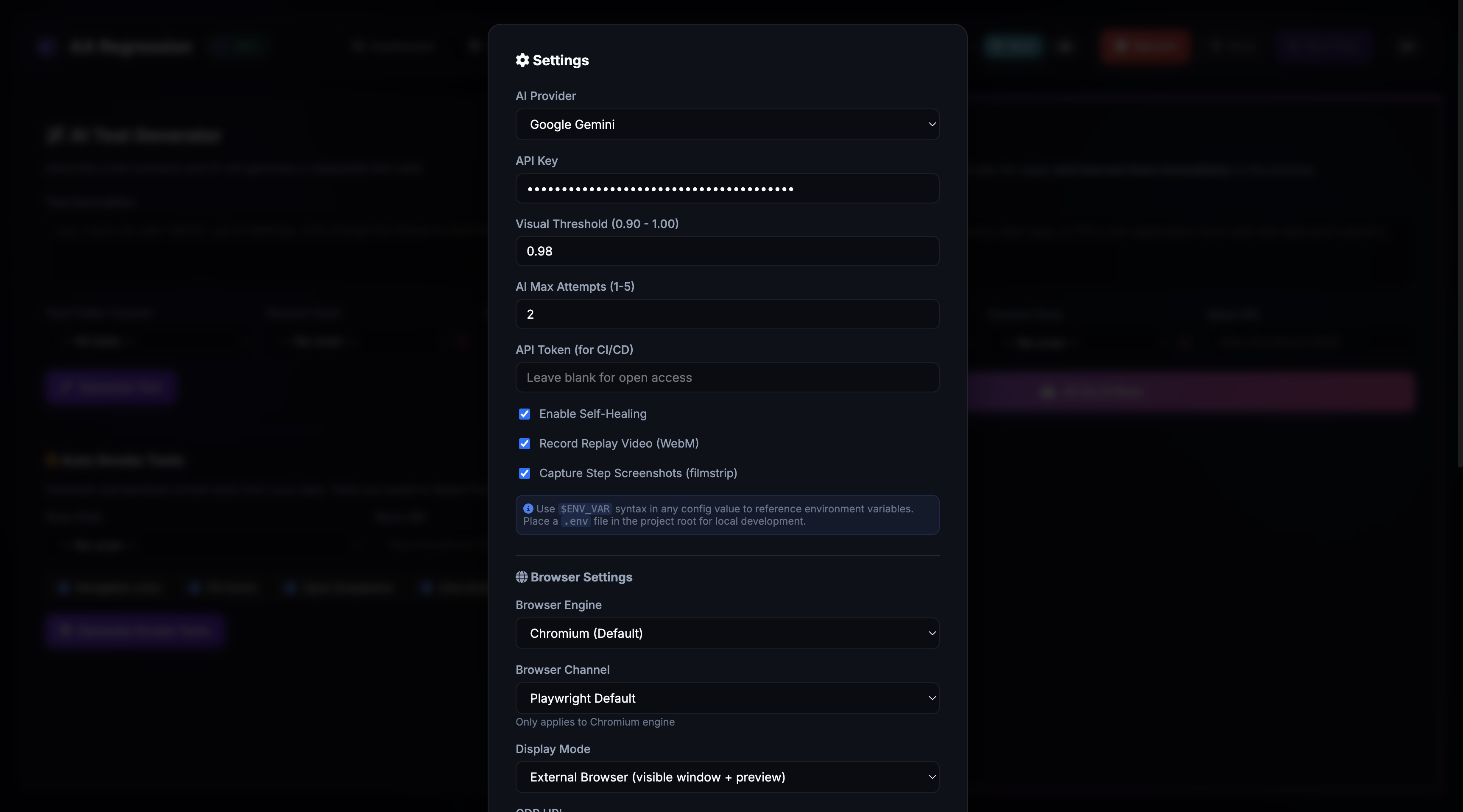
Choose your AI provider (Gemini, OpenAI, or Claude), configure visual regression thresholds, select browser engine and display mode, set up parallel workers, and manage notification channels — all from a single settings modal.
Six pillars of autonomous test automation
When selectors break, AI analyzes the page DOM and proposes corrected selectors. When healing fails, structured Root Cause Analysis explains why — with categories like selector_changed, timing_issue, or app_error.
SSIM-based pixel comparison catches UI regressions. Visual AI assertions let you describe what the page should look like in plain English. Natural language assertions validate logic without writing selectors.
One-click recording from any URL with smart element detection. Save checkpoints mid-session. Edit steps with drag-and-drop reordering. Replay simulates human-like mouse movements and typing with realistic pacing.
Describe what you want to test in natural language. AI generates complete test cases using real selectors from your scanned elements. "AI Do It" generates and immediately runs the test in one click.
Run tests N times with different inputs from CSV or JSON data files. Add conditional branching with if_exists/if_not_exists logic, wait-for conditions, and network assertions to validate API calls.
Run suites across Chromium, Firefox, WebKit, Chrome, and Edge with up to 8 parallel workers. Integrate with any CI/CD pipeline via webhooks, JUnit XML export, and scheduled cron runs.
Everything you need for autonomous test automation & AI enablement
Enter a start URL and the browser navigates there automatically before recording begins. Waits for page load and network idle.
Save actions recorded so far as a named test case without stopping the recording. Create incremental test snapshots on the fly.
Inline-edit selectors and values. Drag-and-drop steps to reorder. Add waits, conditions, and network assertions with dedicated buttons.
Password fields are automatically detected during recording. Actual values are replaced with {{PASSWORD}} placeholders to prevent credential leaks.
Specialized recording and replay for TinyMCE rich text editors. Handles iframe-based content, dynamic IDs, and multi-strategy interaction.
Ctrl+Shift+R to record, Ctrl+Shift+S to stop, Ctrl+Shift+P to play, Ctrl+Shift+Space to pause/resume. No mouse required.
Record WebM video of every replay. Capture PNG screenshots after each step for a filmstrip view. Debug exactly what the browser saw.
Click “Locate” on any step to highlight the element in the live browser. Visual confirmation that selectors are pointing at the right target.
Add steps manually without recording — click, fill, assert, navigate, wait, and more. Full step type picker with selector and value fields.
3-phase in-browser UX: navigate, hover-to-select, then confirm. The test step updates itself with the new selector and replay continues.
Steps are tagged as NAV, ACTION, ASSERT, or CTRL with color-coded badges. Collapsible test settings panel for URL, tags, and metadata.
When selectors break, AI analyzes page context and proposes corrected selectors. Supports Gemini, OpenAI, and Claude with configurable retry attempts.
Describe tests in natural language. AI generates executable test cases with real selectors from your scan data and existing test library as context.
One-click generate-and-run. Describe what to do, and the tool generates the test, saves it, and runs it in the browser immediately.
Generate smoke tests from scan data with 4 built-in templates: navigation links, fill all forms, open all dropdowns, and click all buttons.
Automatically catalog all interactive elements as you browse. Detects buttons, links, inputs, selects, MUI components, and more.
When healing fails, AI provides structured analysis: root cause, suggestion, and category (selector_changed, timing_issue, app_error, etc.).
Screenshot comparison using Structural Similarity Index. Configurable thresholds (0.90–1.00). Side-by-side diff viewer with baseline, current, and diff images.
Describe what the page should look like in natural language. AI analyzes a screenshot and returns pass/fail with an explanation. Supports all 3 AI providers.
Write any assertion in plain English: "The total price should be greater than $0". AI evaluates both screenshots and DOM context for judgment.
Validate that specific HTTP requests occurred during replay. Match by URL pattern, HTTP method, and expected status code.
Define mock API responses with custom status codes, bodies, headers, and artificial delays. Isolate frontend tests from backend dependencies.
Wait for elements (visible, hidden, attached, detached), URL patterns, or text appearance with configurable timeouts. Essential for dynamic UIs.
Add if_exists / if_not_exists conditions with then/else action arrays. Supports nested conditions for complex test flows.
Attach CSV or JSON data files. Tests run N times with different inputs using {{variable_name}} syntax in selectors and values.
Configure dev, staging, and production environments. URLs are automatically swapped during replay. CLI supports --env flag for headless runs.
3-phase in-browser UX: navigate to find the element, hover to select it, then confirm. The test updates itself and replay continues.
Per-step timing recorded during every replay. Timing badges flag slow steps (>2s). Historical trend data via API for the last 20 runs.
Organize tests into subfolders with drag-and-drop. Add tags like "smoke" or "critical". Instant search filters by path and name with 300ms debounce.
Enter bulk mode to select multiple tests. Run, move, tag, or delete them all at once. Exit bulk mode to return to normal view.
Every modification is recorded: manual edits, AI healing, re-pointing, bulk changes. View full change history with timestamps and icons.
Doughnut chart showing aggregated passed, failed, and healed test counts. Overall pass rate percentage updates automatically after each run.
Export results as JUnit XML for CI/CD pipelines or self-contained dark-theme HTML reports. Available via API, CLI, or dashboard download.
Create suites, run them with live progress tracking, schedule via cron or intervals. Suite cards show pass rate, duration, and mini colored bar.
Chromium, Firefox, WebKit, Google Chrome, and Microsoft Edge. External (visible) or embedded (headless) display modes.
1–8 concurrent workers via ThreadPoolExecutor. Isolated browser contexts for each test. Results preserved in original order.
Dockerfile and docker-compose.yml included. Python 3.11-slim with Playwright pre-installed. Volumes for persistent test data and configuration.
Built-in login with PBKDF2-SHA256 hashing (260,000 iterations). Secure session management with HttpOnly, SameSite, and Secure cookies.
API keys and sensitive values encrypted at rest using Fernet symmetric encryption. Decryption happens transparently on load.
CSP, X-Frame-Options: DENY, X-Content-Type-Options: nosniff, strict Referrer-Policy, and Permissions-Policy on all responses.
Slack webhooks, Microsoft Teams MessageCards, and SMTP email. Configurable: notify always, on failure only, or never. Channels are independent.
Import Selenium IDE .side files. Export standalone async Playwright Python scripts. Full round-trip compatibility with existing test ecosystems.
Every selector tested against the live DOM during recording. Auto-upgrades to the most unique selector available. Purple toast notifications show improvements in real-time.
Automatically detects MUI, Bootstrap, Ant Design, Vuetify, Radix, Chakra, and 10+ other framework dropdowns — records them as proper selections, not brittle clicks.
Captures human-readable labels for every element so tests are self-documenting. Labels are used in AI annotation and MCP export descriptions.
When multiple elements share the same ID (common in Bootstrap), the recorder detects it and uses alternative selectors automatically.
Drag-and-drop captures exact pixel offsets, not just center-of-target. Ensures pixel-perfect replay of complex drag interactions.
Detects and records resize handle interactions with precise positioning for panel and element resize operations.
Lock tests to prevent accidental modification. AI auto-annotates each step on certification. Bulk operations automatically skip certified tests.
When you certify a test, AI adds human-readable descriptions, interaction types, and field labels to every step — making exports and reports self-documenting.
4 KPI cards (Pass Rate, Total Runs, Avg Duration, AI Healed), trend charts, top failures, slowest tests, and AI healing success rate.
Stop any test at any time — responsive even during AI healing or re-pointing. No more waiting for a broken test to time out.
DOM alerts, toasts, and notifications are automatically captured during replay with type classification (danger, warning, success, info).
AI-generated tests that fail with validation errors are auto-corrected using failure screenshots and error messages — up to 3 attempts.
AI vision checks after drag-drop sequences to detect overlapping elements. Catches UI issues that pixel comparison misses.
Export certified tests as a standalone MCP server with analyze_task tool and site://mandatory-fields resource. Any AI can operate your website.
17 AI-callable tools for controlling the regression tester via Claude or any MCP client. Run tests, view analytics, generate tests, manage suites.
Full analytics tab with date range filters, trend charts, top failures, slowest tests, and AI healing success rate.
Mark any test step as mandatory with a gold star toggle. AI generation always includes them verbatim. Bundled into MCP Export for structured AI questions.
AI asks clarifying questions about mandatory fields, dropdown values, and test data before generating tests. Question types include free text, option chips, and multi-select.
If AI analysis fails, it falls through to direct execution — no crash, no delay. “Skip Questions” button for users who want immediate execution.
Five steps to autonomous testing & AI enablement
Browse your application while recording — every click, type, drag, and navigation is captured with smart element detection. Or describe what to test in plain English and let AI generate the test case. Save checkpoints mid-recording. Passwords are auto-redacted.
Organize tests into folders with tags and search. Set up suites with cron schedules. Configure multi-environment URLs so the same tests run against dev, staging, and production. Add data-driven parameters, conditional logic, and network mocks.
Execute tests across Chromium, Firefox, WebKit, Chrome, and Edge with up to 8 parallel workers. Get video recordings, per-step screenshots, and performance baselines for every run. Watch live progress in the dashboard or run headless via CLI.
When selectors break, AI automatically repairs them. Flaky tests are detected and flagged. Get notifications via Slack, Teams, or email. Export JUnit XML for CI/CD — or export an MCP server that turns your tested website into an AI-operable application.
Certify your best tests, click Export MCP Server, and hand the zip to any team that wants AI assistants to operate the website. The generated server includes workflow tools, atomic actions, and full site knowledge — ready for Claude Desktop in minutes.
From encrypted secrets to hardened headers, security is the foundation — not an add-on
AA Regression Tester runs entirely on your local machine — no cloud service required. Authentication, encryption, and security headers are built into every layer, from login to API access to test data storage.
SHA-256 with 260,000 iterations and random 32-byte salt per user
API keys and secrets encrypted with symmetric Fernet encryption in config.json
Password fields auto-detected during recording and replaced with {{PASSWORD}} placeholders
CSP, X-Frame-Options: SAMEORIGIN, X-Content-Type-Options, strict Referrer-Policy
HttpOnly, SameSite=Lax, and Secure cookie flags with randomly generated secret keys
Bearer token auth for CI/CD endpoints with timing-safe comparison
Containerized with docker-compose. Persistent volumes for test data and config
Separate dev, staging, and production configurations with automatic URL swapping
Bearer token authentication on all API routes — MCP servers and external tools authenticate seamlessly
Certified/locked tests prevent accidental modification of production-verified workflows
The most comprehensive testing platform on the market
| Capability | Selenium / Cypress | Cloud Platforms | AA Regression Tester |
|---|---|---|---|
| Self-healing | ✘ No | Basic (DOM) | ✔ AI-powered (3 providers) |
| Natural language assertions | ✘ No | ✘ No | ✔ Yes |
| Visual AI | ✘ No | Expensive tier | ✔ Built-in |
| Root cause analysis | ✘ No | ✘ No | ✔ AI-generated reports |
| MCP / AI Bridge | ✘ No | ✘ No | ✔ 1-click export |
| Conversational AI generation | ✘ No | ✘ No | ✔ AI asks before generating |
| Mandatory field enforcement | ✘ No | ✘ No | ✔ Mark & preserve |
| Analytics dashboard | ✘ No | Basic | ✔ Full trend analysis |
| Certified tests | ✘ No | ✘ No | ✔ Lock + AI annotation |
| Smart retry | ✘ No | Basic | ✔ Screenshot-based correction |
| Self-hosted | ✔ Yes | ✘ No | ✔ Full data control |
| Framework detection | ✘ No | ✘ No | ✔ MUI, Bootstrap, Ant, 10+ |
| Cost | Free (DIY) | $300-2000/mo | ✔ Competitive |
Enterprise-grade stack for reliability and performance
Browsers, CI/CD, notifications, and import/export compatibility
Everything you need to know before getting started
No. The tool operates through the browser UI, just like a human would. Any website that works in a browser works with AA Regression Tester.
All three (Gemini, OpenAI, Claude) work well. We recommend Claude for the best natural language understanding, but you can switch providers anytime.
Yes! Import .side files from Selenium IDE and they're converted automatically. You can also export Playwright Python scripts for use in your existing CI/CD pipelines.
It packages your certified test workflows into a standalone server that any AI assistant can use to operate your website — no changes to the website needed. It even includes an analyze_task tool that guides the AI through mandatory fields.
No. The exported server uses Playwright for browser automation. The analyze_task tool does local fuzzy-matching — no AI API calls needed. The AI client (Claude, GPT) provides its own intelligence.
You mark certain test steps (like required form fields) as mandatory. The AI generation system always includes them, and the exported MCP server knows to ask about them before running workflows.
Only AI API calls (using your own key) leave your machine. All test data, recordings, and configuration stay local. Full self-hosted data control.
We're self-hosted (full data control), support 3 AI providers, have natural language assertions, AI root cause analysis, conversational AI generation, mandatory step enforcement, and the MCP Export — none of which competitors offer.
Choose the plan that fits your team
Perfect for small teams and side projects
For growing teams with serious testing needs
For organizations requiring custom solutions
Join teams using the most complete AI-powered test automation platform